
Forex trading tools help traders analyse currency pairs, plan trades, manage risk and make more structured decisions. These tools can include charting platforms, technical indicators, economic calendars, calculators, demo accounts, trading journals and technical analysis software.
According to Research and Markets, the online forex trading platform market is expected to grow from $13.29 billion in 2025 to $14.76 billion in 2026, reflecting demand for real-time currency trading, market analysis, automated trading solutions and risk management tools. This shows why forex traders increasingly rely on trading tools to analyse markets, plan trades and manage risk in one workflow.
For forex traders, tools are not a replacement for strategy or risk management. They are used to organise information, identify possible setups and review market conditions before entering a trade. The best forex tools help traders combine chart analysis, risk planning, market news and platform practice in one workflow.
This guide explains the main types of forex trading tools, how technical analysis software works, how MT4 and MT5 compare with external charting tools and how traders can choose the right tools for their trading style.
Key Takeaways
- Forex trading tools help traders analyse charts, track economic events, calculate risk and practise strategies.
- Technical analysis tools include indicators, drawing tools, trendlines, support and resistance levels and chart patterns.
- Technical analysis software such as MT4 and MT5 can help traders study price movement and manage trading decisions.
- Beginners usually do not need too many tools. A charting platform, a few indicators, an economic calendar and a demo account are often enough to start.
- The best forex trading tools are the ones that fit the trader’s strategy, risk rules and level of experience.
What Are Forex Trading Tools?
Forex trading tools are resources that help traders analyse the forex market and manage trades. Some tools are built into trading platforms, while others are separate resources used for research, risk planning or education.
Common forex tools include:
- charting platforms
- technical indicators
- drawing tools
- economic calendars
- forex calculators
- trading journals
- demo accounts
- news and sentiment tools
- mobile trading apps
A trader may use a charting platform to analyse price movement, an economic calendar to track major news events and a demo account to practise before trading with real money.
The right combination depends on the trader’s experience level, strategy, preferred currency pairs and risk tolerance. A beginner may need simple charting, a few indicators and a demo account, while a more experienced trader may use advanced technical analysis software, alerts, backtesting and performance tracking.
How Forex Trading Tools Work Together
Forex trading tools are most useful when they support different parts of the trading process. A charting platform may help traders read price movement, while technical indicators can confirm momentum or trend direction. An economic calendar can highlight upcoming events, and risk tools can help calculate position size before entering a trade.
A basic forex trading workflow may look like this:
| Trading step | Useful tool | Purpose |
| Market selection | Watchlist or platform dashboard | Choose which currency pairs to monitor |
| Market context | Economic calendar and news tools | Check upcoming events and market drivers |
| Chart analysis | Charting platform and drawing tools | Identify trend, support, resistance and price behaviour |
| Confirmation | Technical indicators | Review momentum, trend strength or volatility |
| Risk planning | Forex calculators and stop-loss tools | Estimate position size, margin, pip value and risk |
| Practice | Demo account | Test the setup without using real money |
| Review | Trading journal | Track results, mistakes and repeated patterns |
Using tools together can make trading more structured. However, traders should avoid using too many tools for the same decision. For example, adding several momentum indicators to one chart may create more confusion than clarity. A simpler workflow is often easier to repeat, test and improve.
How to Build a Forex Trading Workflow With Different Tools
A trader might start by checking an economic calendar to see if any major events are scheduled for the day. If there is an upcoming interest rate decision, inflation report or employment release, the trader may decide to wait until volatility settles before analysing a trade setup.
Next, the trader can open a charting platform and review the currency pair across more than one timeframe. For example, the daily chart may show the broader trend, while the 1-hour chart may help identify a possible entry area. Drawing tools can then be used to mark support, resistance and trendlines.
Technical indicators can be added for confirmation. A moving average may help show trend direction, RSI may show momentum and a volatility tool may help estimate how wide the stop-loss should be. Before entering the trade, the trader can use a calculator to check pip value, margin and position size.
After the trade is closed, a trading journal can help record the setup, result and any mistakes. This turns forex tools into a complete process instead of separate features used randomly.
Best Technical Analysis Software for Forex
Forex technical analysis software helps traders study price movement through charts, indicators, drawing tools and alerts. In forex, this software is often used to analyse trends, momentum, volatility, support and resistance and possible entry or exit points.
A strong technical analysis platform should help traders answer practical questions, such as:
- Is the currency pair trending or ranging?
- Where are the nearest support and resistance levels?
- Is momentum increasing or slowing?
- Are there upcoming news events that could affect the trade?
- What is the planned entry, stop-loss and take-profit level?
- Is the trade size appropriate for the account risk?
The best technical analysis software for forex usually includes:
| Feature | Why it matters |
| Multiple chart types | Helps traders view price action through line, bar or candlestick charts |
| Multiple timeframes | Allows traders to compare short-term and long-term market structure |
| Technical indicators | Supports trend, momentum and volatility analysis |
| Drawing tools | Helps mark support, resistance, trendlines and chart patterns |
| Alerts | Notifies traders when price reaches important levels |
| Order tools | Helps traders place and manage trades from the platform |
| Mobile access | Allows traders to monitor charts away from desktop |
| Demo mode | Lets beginners practise before trading live |
Technical analysis software does not predict the market with certainty. It helps traders organise information and build a structured view of price action. The value of the software depends on how clearly it supports the trader’s process.
For beginners, the best technical analysis software is usually the one that is easy to navigate and supports simple analysis. A platform with clean charts, basic indicators and clear order tools is often more useful than advanced software with too many features.
MT4, MT5 and External Charting Software for Forex Analysis
MT4, MT5 and external charting tools are commonly used by forex traders for technical analysis. Each option can support chart reading, indicator use and market review, but the best choice depends on how the trader analyses markets and places trades.
| Platform type | Best for | Key strengths | Beginner note |
| MetaTrader 4 | Forex trading and simple technical analysis | Familiar interface, indicators, Expert Advisors and order tools | Good for traders who want a widely used forex platform |
| MetaTrader 5 | Multi-asset trading and deeper analysis | More timeframes, more order types and more built-in tools | Better for traders who want more platform features |
| External charting software | Visual chart analysis and research | Drawing tools, alerts, watchlists and market layouts | Useful for analysis, but traders should check platform compatibility |
MT4 is often used by forex traders who want a simple platform with familiar tools. MT5 offers more built-in features and can suit traders who want broader market access. External charting tools can be useful for visual analysis, but traders should confirm how they fit with their broker or trading platform before relying on them for their full workflow.
Traders should choose a forex trading platform based on how they analyse markets, place trades and manage risk. A beginner may prefer the simplest setup, while an experienced trader may value more timeframes, alerts, custom indicators or broader market coverage.
Free vs Paid Forex Trading Tools
Many forex trading tools are available for free, while others require a subscription, platform access or broker account. Beginners do not always need paid tools immediately. In many cases, free tools are enough to learn chart reading, practise basic analysis and build a trading routine.
| Tool type | Free tools may be enough for | Paid tools may be useful for |
| Charting platforms | Basic chart reading and simple indicators | Advanced alerts, layouts, data or custom indicators |
| Economic calendars | Tracking major scheduled events | More detailed filters, alerts or research tools |
| Forex calculators | Basic pip, margin or profit estimates | More advanced risk and portfolio calculations |
| News tools | General market updates | Faster feeds, deeper analysis or professional research |
| Demo accounts | Practising platform use and basic strategies | Usually not needed for beginners |
| Trading journals | Basic notes and spreadsheet tracking | Advanced analytics, tagging and performance dashboards |
Free forex trading tools can help beginners understand the market without adding extra cost. However, traders should check that free tools are reliable, easy to use and suitable for the markets they follow.
Paid tools may become useful when a trader needs more advanced analysis, detailed alerts, automated tracking or deeper performance review. A paid tool should solve a real problem in the trader’s workflow, not just add more information.
When Paid Forex Tools May Not Be Worth It
Paid forex tools are not always necessary, especially for beginners. A paid platform, signal service or advanced analytics dashboard may look useful, but it can also add complexity before the trader has a clear strategy.
A paid tool may not be worth it if:
- the trader does not understand the basic strategy yet
- the tool creates more signals than the trader can manage
- the same function is available through a free tool
- the tool encourages overtrading
- the trader cannot explain how the tool improves their process
Before paying for advanced forex tools, traders should know exactly what problem the tool solves. In many cases, a demo account, charting platform, economic calendar and trading journal are enough to build a strong foundation.
Technical Analysis Tools for Forex Traders
Technical analysis tools help traders study past and current price movement. They can show trend direction, momentum, volatility and possible support or resistance areas.
Price Charts
Price charts are the foundation of technical analysis. Forex traders use charts to see how a currency pair has moved over time.
The most common chart types are:
- line charts
- bar charts
- candlestick charts
Forex candlestick charts are popular because they show the open, high, low and close for each period. Traders can use them to study price behaviour, momentum and market reactions.
Beginners can learn the basics through a guide on how to read forex charts.
Trendlines and Drawing Tools
Drawing tools help traders mark important levels on a chart. These can include trendlines, support and resistance zones, channels and price ranges.
A trendline trading strategy can help traders understand trend direction, possible continuation setups and potential breakout areas.
Drawing tools are useful because they make analysis more visual. However, traders should avoid drawing too many lines, as this can make the chart harder to read.
Moving Averages
Moving averages smooth price data and help traders identify the general direction of the market. A rising moving average can suggest upward momentum, while a falling moving average can suggest downward momentum.
Beginners often use moving averages to understand trend direction, but they should not rely on them alone. A moving average can lag behind price because it is based on past data.
RSI
The Relative Strength Index, or RSI, is a momentum indicator. It is often used to identify overbought or oversold conditions and possible shifts in momentum.
For example, a very high RSI reading may suggest that a currency pair has moved strongly upward, while a very low reading may suggest strong downward movement. Traders should use RSI with price action and other context.
MACD
MACD is another momentum tool used to identify changes in trend strength. Traders may watch MACD lines, crossovers and histogram changes to understand if momentum is increasing or weakening.
Like other indicators, MACD should be used as part of a broader trading plan rather than as a standalone signal.
Volatility Tools
Volatility tools help traders understand how much a currency pair is moving. This can be useful for stop-loss placement, position sizing and trade timing.
Traders may use volatility indicators together with knowledge of forex volatility to avoid entering trades during unstable or unclear conditions.
How to Combine Technical Analysis Tools Without Overcomplicating the Chart
Technical analysis tools work best when each tool has a clear purpose. A trader does not need several indicators that all measure the same thing. For example, using multiple momentum indicators together may create overlapping signals and make the chart harder to interpret.
A simple setup might include:
| Tool | Purpose |
| Candlestick chart | Shows price movement and market reaction |
| Support and resistance | Marks important price zones |
| Trendline or moving average | Helps identify direction |
| RSI or MACD | Adds momentum confirmation |
| Economic calendar | Shows upcoming events that may affect the setup |
This kind of setup keeps the chart readable. The trader can first analyse price action, then use one or two tools for confirmation instead of relying on indicators alone.
Forex Calendars and News Tools
Forex prices can move sharply around economic announcements. Interest rate decisions, inflation reports, employment data and central bank comments can all affect currency pairs.
An economic calendar helps traders see when major events are scheduled. This can help them decide if they want to trade, wait or reduce risk before a high-impact announcement.
News tools can also help traders understand why a currency pair is moving. For example, a sudden move in USD pairs may be linked to US inflation data, Federal Reserve comments or labour market figures.
Traders who want to understand this approach can study forex news trading strategies, but beginners should be careful. News trading can involve fast price movement, wider spreads and higher emotional pressure.
Forex Calculators and Risk Management Tools
Risk tools are some of the most important forex trading tools. They help traders plan trades before entering the market.
Useful risk management tools include:
| Tool | What it helps with |
| Pip calculator | Estimates the value of a pip move |
| Margin calculator | Shows how much margin may be needed |
| Profit calculator | Estimates potential profit or loss |
| Position size calculator | Helps match trade size to account risk |
| Stop-loss tool | Helps define where risk is limited |
A trading setup may look strong, but the trade can still be risky if the position size is too large. This is why forex risk management should come before trade entry.
Traders should also understand forex spreads, because spreads affect the cost of opening and closing trades.
How to Use a Forex Calculator Before Trading
A forex calculator can help traders understand risk before they open a position. For example, a trader may want to buy a currency pair but only risk a small percentage of their account. Before placing the trade, they can calculate the pip value, estimate the distance between entry and stop-loss and choose a position size that fits their risk limit.
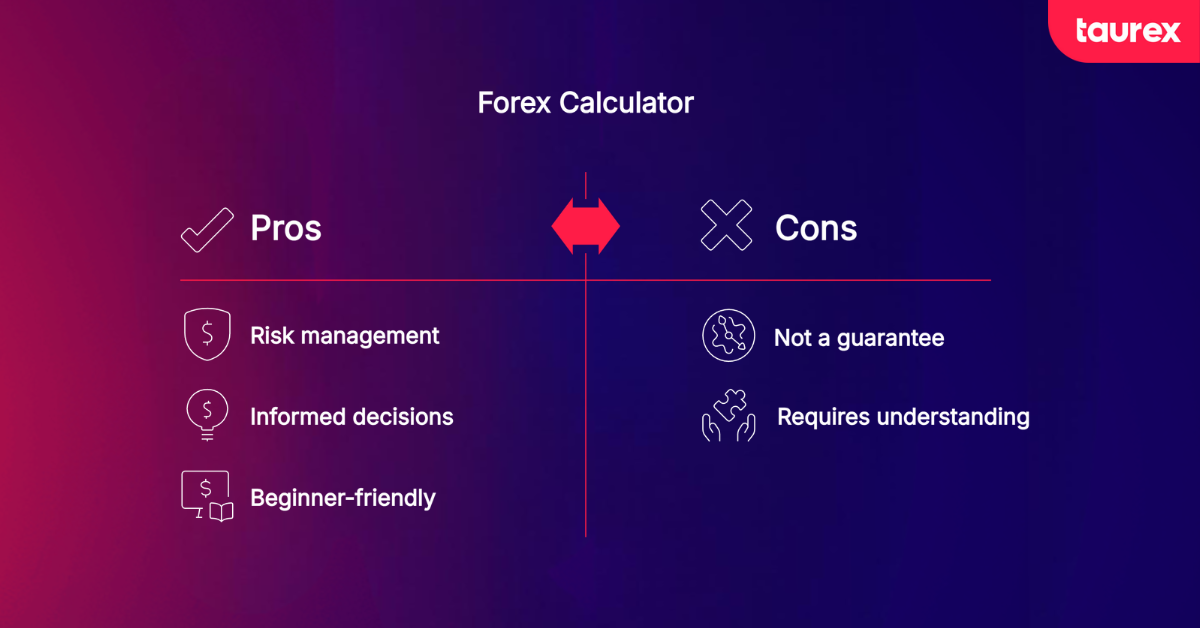
This is important because two trades with the same setup can carry very different risk depending on trade size. A small position with a clear stop-loss may be manageable, while an oversized position can create unnecessary pressure even if the analysis is reasonable.
Forex calculators are especially useful for beginners because they make risk more visible. Instead of guessing the trade size, traders can plan the trade before entering the market.
Sentiment and Trading Ideas Tools
Sentiment and trading ideas tools can help traders understand market context. They may show general market mood, popular trade ideas, analyst commentary or how traders are reacting to news.
These tools can be useful for checking if a trade idea fits the wider market environment. For example, if a currency pair is moving strongly after a central bank announcement, sentiment tools may help explain the reaction.
However, sentiment should not replace chart analysis or risk planning. Before using a trading idea, traders should still check:
- the trend
- support and resistance
- volatility
- upcoming news
- risk per trade
- stop-loss and take-profit levels
A trading idea is not a trading plan unless the trader understands the reason for entry, exit and risk. Sentiment can add context, but it should not become the only reason to enter a trade.
Backtesting and Demo Trading Tools
Backtesting helps traders review how a strategy may have performed on historical price data before using it for algorithmic forex trading or live execution. Demo trading helps traders practise in a simulated environment without risking real money.
Both tools can be useful, but they serve different purposes.
| Tool | Main purpose | Limitation |
| Backtesting | Reviews how a strategy may have worked in the past | Past results do not guarantee future results |
| Demo trading | Practises trades with virtual funds | Does not fully recreate live trading emotions |
| Trading journal | Tracks results and mistakes | Only useful if reviewed consistently |
A forex demo account can help beginners practise using charts, indicators, order types and risk tools before moving to live trading.
Demo trading should be treated seriously. Traders should use realistic position sizes, stop-losses and a basic trading plan.
Which Forex Tools Do Different Traders Need?
The best forex tools depend on the trader’s strategy, experience level and trading timeframe. A beginner who is learning chart basics may need different tools from an experienced trader testing multiple strategies.
| Trader type | Useful tools | Why they matter |
| Beginner trader | Demo account, simple charting platform, economic calendar, basic indicators | Helps build basic market understanding without overcomplication |
| Technical trader | Charting software, drawing tools, RSI, MACD, moving averages, alerts | Supports price action, trend and momentum analysis |
| News-aware trader | Economic calendar, news tools, volatility tools, forex spreads guide | Helps prepare for events that may move currency pairs |
| Risk-focused trader | Pip calculator, margin calculator, position size calculator, trading journal | Helps plan risk before entering trades |
| Mobile trader | Trading app, alerts, watchlists, mobile charting tools | Helps monitor markets away from desktop |
| Strategy tester | Demo account, backtesting tools, trading journal | Helps test ideas before live trading |
Beginners should not try to use every tool at once. A simple setup may include a charting platform, one or two indicators, an economic calendar, a demo account and a basic journal. More tools can be added later when there is a clear reason for using them.
How to Choose the Best Forex Trading Tools
The best forex trading tools depend on the trader’s goals, experience level and trading style. A beginner may need simple charting, basic indicators and a demo account. A more experienced trader may want advanced technical analysis software, alerts, backtesting and deeper market data.
When comparing forex tools, traders should check:
| Factor | What to consider |
| Ease of use | Is the tool simple enough to use consistently? |
| Charting features | Does it support the chart types and timeframes needed? |
| Indicators | Does it include useful technical indicators? |
| Risk tools | Can it help with position size, margin and stop-loss planning? |
| Market access | Does it support the currency pairs the trader wants to follow? |
| Platform stability | Does it work reliably during active market conditions? |
| Mobile access | Can traders monitor positions away from desktop? |
| Demo access | Can users practise before trading live? |
| Cost | Is the tool free, included or subscription-based? |
A tool should make the trading process clearer. If it creates confusion, adds unnecessary signals or encourages impulsive decisions, it may not be the right fit.
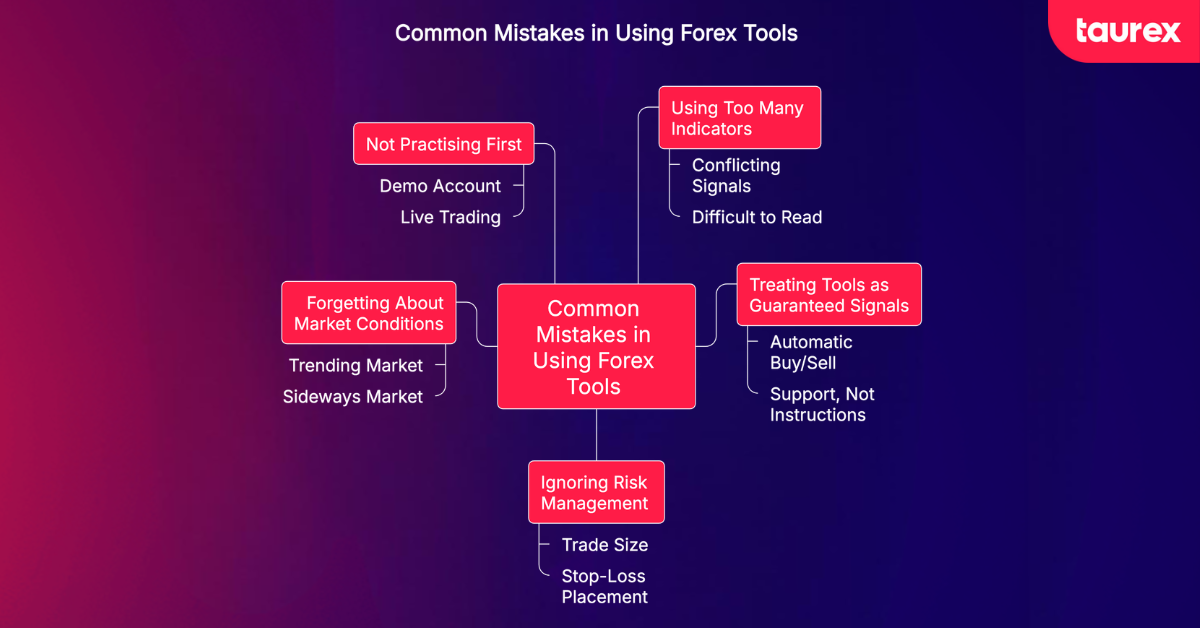
What Are the Common Mistakes When Using Forex Tools?
Forex tools can support better decisions, but they can also create problems when used incorrectly.
Using Too Many Indicators
Too many indicators can make a chart difficult to read. Beginners may receive conflicting signals and struggle to make decisions.
It is usually better to start with a small set of tools, such as price action, support and resistance, one trend indicator and one momentum indicator.
Treating Tools as Guaranteed Signals
No tool can guarantee a profitable trade. Indicators, calendars and trading ideas should be used as support, not as automatic buy or sell instructions.
Ignoring Risk Management
Some traders focus on finding the best indicator but ignore trade size, stop-loss placement and daily loss limits. This can lead to large losses even if the analysis is reasonable.
Forgetting About Market Conditions
A tool that works in a trending market may perform poorly in a sideways market. Traders should consider volatility, liquidity and news events before relying on a setup.
Not Practising First
Beginners should practise with a demo account before using new tools in live trading. This helps them understand how the tool works and how it fits into their trading process.
Practise Forex Trading Tools With Taurex
Taurex provides access to tools that can help traders analyse markets and practise before trading live. Traders can use MT4, MT5 and the Taurex trading app to review charts, place orders and manage positions.
A demo account can help traders practise using forex tools in a realistic workflow. Instead of opening random trades, traders can build a routine around analysis, risk planning and review.
For example, a trader can use a demo account to:
- open a chart and choose a currency pair
- mark support and resistance levels
- add technical indicators for confirmation
- check upcoming events on the economic calendar
- calculate position size and possible risk
- practise placing different types of forex orders
- set stop-loss and take-profit levels
- review the trade after it closes
This helps traders understand how different tools work together before real money is involved. It also gives beginners time to test platform features, practise order placement and build confidence with technical analysis tools.
Traders can open a demo account to practise forex trading tools in a simulated environment before moving to live trading.
Conclusion
Forex trading tools can help traders analyse markets, plan trades and manage risk more effectively. The most useful tools include charting platforms, technical indicators, economic calendars, risk calculators, demo accounts and trading journals.
Technical analysis software such as MT4 and MT5 can help traders study price movement and identify potential setups. However, tools should support a clear trading plan, not replace it.
Beginners should start with simple tools, practise in a demo account and focus on risk management before trading live. As experience grows, traders can add more advanced tools that match their strategy and trading goals.
FAQs
What are forex trading tools?
Forex trading tools are resources that help traders analyse currency pairs, plan trades, manage risk and review performance. They can include charts, indicators, economic calendars, calculators, demo accounts and trading journals.
What are the best forex tools?
The best forex tools depend on the trader’s goals, but useful tools often include a reliable charting platform, technical indicators, an economic calendar, forex calculators, a demo account and a trading journal.
What are the best forex trading tools for beginners?
The best forex trading tools for beginners are usually a simple charting platform, a few technical indicators, an economic calendar, a demo account and basic risk management tools. Beginners should avoid using too many tools at once.
How should beginners build a forex trading toolkit?
Beginners should start with a simple toolkit: a charting platform, economic calendar, basic technical indicators, risk calculator, demo account and trading journal. This gives them enough tools to analyse price movement, plan trades and review mistakes without making the process too complex. More advanced tools can be added later when the trader has a clear strategy.
What technical analysis tools are used in forex?
Common technical analysis tools used in forex include candlestick charts, trendlines, support and resistance, moving averages, RSI, MACD and volatility indicators. These tools help traders analyse trend, momentum and price behaviour.
What is the best technical analysis software for forex?
The best technical analysis software depends on the trader’s needs. MT4 is widely used for forex trading, while MT5 offers more timeframes, order types and built-in analysis features.
Is MT4 or MT5 better for forex analysis?
MT4 can suit traders who want a familiar forex-focused platform with common indicators and Expert Advisors. MT5 may suit traders who want more timeframes, more order types and broader market analysis tools.
Can external charting software be used for forex technical analysis?
Yes. External charting software can be used for forex technical analysis if it offers charts, indicators, drawing tools, alerts and watchlists. Traders should check how it fits with their broker and trading platform before relying on it.
What forex tools help with risk management?
Forex risk management tools include pip calculators, margin calculators, profit calculators, position size calculators, stop-loss tools and trading journals. These tools can help traders plan risk before opening a position.
Are free forex trading tools enough for beginners?
Free forex trading tools can be enough for beginners who are learning the basics. A free charting platform, economic calendar, demo account and simple indicators can help traders practise before they consider paid tools.
Are forex trading tools enough to make profitable trades?
No. Forex trading tools can support analysis, but they do not guarantee profitable trades. Traders still need a trading plan, risk management, discipline and regular review.
Can beginners practise forex tools with a demo account?
Yes. A demo account allows beginners to practise using charts, indicators, order types and risk tools without using real money. This can help traders build confidence before moving to live trading.